
Saturday, June 30, 2012

Update: Digital Camera Raw Compatibility 3.14

This is a an update I did couple days ago: Digital Camera Raw Compatibility update 3.14.

The new OS X will be released next month any time. According to WWDC 2012, the new OS X will have auto update feature. Not sure if user would not need to accept update any more. Auto update would nice, but I would not be able to record my Mac update any more.

Here is the snapshot of the update:


The following is the comparison of spaces used before and after of the updates:

Command: df -lakUsed(Kilobytes in 1024-blocks)
Before...35,036
After...22,384
Difference (A-B)-12,652

Tuesday, June 19, 2012

WWDC 2012 Videos Available Now

Today I got news about WWDC 2012 Videos available from Apple's Development site from Weibo. I will be busy to watch all those training videos. The following is the snapshot of iTunes.


Reference


Friday, June 15, 2012

Updates: iTunes, Java and Airport

I had the following updates on June 20, 2012. In the past days, a lots things happened for Apple. WWDC started on Monday (Jun 11), and today is the last date of the WWDC. Tim Cook and his team's keynote speech was a great one, with a new line of MBP< specially Retina MBP 15, OS X and iOS6.

I read many reviews and critics on R-MBP15. It is a top line laptop, beautifully designed and with huge power. The demand of this product is very hot. At Apple store, the shipping date has been delayed at the start from 1-2 weeks to 3-4 weeks after two days. I phoned local Market Mall Apple store, they don't have stock yet, but the model is in show at the store.

In the past week, I watched Steve Jobs' previous talks at AllThingsD from 2003 to 2010, available at iTunes podcast.  The podcast lists as top one. I enjoyed watching the interviews with Steve. Looking back from this history, with my wittiness of Apple's innovations and growth, I have better understanding of Steve and Apple. We have been so fortunate to have Steve with us during Century. My life has been changed because of this.

Here are snapshots of the updates:


The following is the comparison of spaces used before and after of the updates:

Command: df -lakUsed(Kilobytes in 1024-blocks)
Before...49,860
After...73,920
Difference (A-B)24,060

Saturday, May 26, 2012

Rip DVD and Edit Movie

Last week I got a DVD from my friend. He went an annual conference and made a DVD with several talks. I really like the first talk on the DVD and want to cut it out and make it as another DVD.

Warning: there is a copyright issue related to copy DVD. In my case, the DVD has no copyright issue and we can share as personal use. If there is any copyright issue, you should not do it, or the DVD may have some encryption to prevent copying.

Rip DVD


The software I used to rip the DVD is HandBake. It requires the latest VLC 64bit version. I updated my VLC. It works well for my case. To rip a DVD is very straightforward. Just insert the disk and launch HandShake.app (the app was installed on Mac). Here is the screen snapshot:
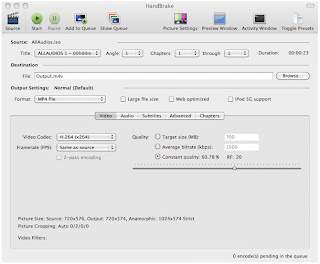

I use the MP4 file format. Click on Start button on the toolbar to start the rip process. I think it works in a way to convert the streaming from VLC as the required format file.

It seems that there is no way to only rip a video with start and end time. I have to rip the complete DVD off.

It will take a while to rip the DVD off as m4v format. In terms of disk space, it is not too bad. For my case, the complete 139 minute's DVD takes about 800MB disk space.

Now it is time for video editing.

Edit Video


Since what I want is the first part of the show, I don't need to use iMovie to edit m4v file. It would take another long time to import the m4v into iMovie if I used iMovie app. I decided to use QuickTime Player to edit the video.

First, open the m4v file with QuickTime player. Click on menu View|Show clips or command+E. The video clips are displayed:


Drag the movie cursor in the clip to the position where I want to split. From the menu, select Edit|Split Clip or command+Y. Then the video is split into two sections:


Highlight the section I want to delete,


Then, press the delete key to remove the clip:


Finally, from the menu File|Export... to save the video to another file. That's it!


Depending the size of the video, it may take a while to export or save the video.

Reference


Friday, May 25, 2012

Digital Camera Raw Compatibility Update 3.13

Today I got one update: Digital Camera Raw Compatibility Update 3.13.


The following is the comparison of spaces used before and after of the updates:

Command: df -lakUsed(Kilobytes in 1024-blocks)
Before...9,233,356
After...4,409,852
Difference (A-B)-4,823,504

Thursday, May 10, 2012

Mac OS 10.7.4 Update

It has been for quite for a while. Today Apple released Mac OS update. The size of the update is about 729.6MB.

Update: on the same day, I got another notification of update of Safari 5.1.7. What a busy day. I downloaded the update. One thing interesting, Adobe's Flash notified my its out-of-date and requested me to update during my Safari update. That package is about 10MB. Here I added the snapshot of Safari update and space calculation.


The following is the comparison of spaces used before and after of the updates:

Command: df -lakUsed(Kilobytes in 1024-blocks)
Before...285,368
After...398,104
After Safari...464,960
Difference (A-B)112,736
Difference (AS-A)66,856

Actually, it turned out that it was Apple disabled old Flash during the update. Adobe security chief appraised Apple to keep Mac users with updated Flash.

References

Thursday, April 12, 2012

Java Update 2012-003: Removing Flashback Melware

I read the news from AppleInsider that the Java patch to remove Flashback is available today. I am not sure if my Macs are infected or not. Anyway, I installed the patch.


The following is the comparison of spaces used before and after of the updates:

Command: df -lakUsed(Kilobytes in 1024-blocks)
Before...4,500
After...1,024
Difference (A-B)-3,476

References