Thursday, February 12, 2009

Mac Software Update

New update from Mac. I noticed the update when I read a blog on this security update from MacRumors.com. The following are the detail information about this update:


This update requires Restart.

As a usual step, I smushit those pictures before I insert them to this blog. I saved about 80% space in size for both pictures.

Sunday, February 8, 2009

Rename Files Tool: NameChanger

toolsI posted a blog on some greate Mac software tools in Nov 2008. One of them is NameChanger.

Very often, I need to change names of picture or video files from camera or camcorder to my Mac. This tool is a great one to rename files. Here is the interface of NameChanger:


It provides a wide range of options to rename files and they are good enough to accomplish my need.


For example, the first step I do is to use the Sequence option to rename the entire names to files with sequence numbers and a proper extension name such as .dv. The Sequence has additional options available from a window:


After that, I then use the Prepend option to add whatever prefix words at the beginning of the files. Just two actions to rename files in the format I need.

Friday, February 6, 2009

Mac Software Update

Today I found several Mac software updates. I took screen shots of them as followings.

I am going to blog all the Mac updates for my personal references as much as I can. This is another usage of blog.

I use some screen shot cut keys to make a copy of the update windows: S-Cmd-4, space bar, then click on the update window. S-Cmd-4 only is used to cut an area; and S-Cmd-Ctrl-4 for copying to clipboard. I have to repeat using these keys so that I can remember them, power of Muscle Memory.

All there updates look like iWork related. Actually I have not used them in my iMac yet. I use NeoOffice.app instead, which are great tools and free.


After the installation, no restart is required.

To save blogger's disk space, always using smuchit.com tool to compress graphics first. This may reduce image sizes a lot, no matter how small they are.

Saturday, January 31, 2009

Audio CD Ripper Tool: Max

Today, I tried to do recording from my audio CD by using Audacity and could not figure out a way to record from internal device. From Audacity, I only have option to record from Mac's microphone.

The another alternative is to find out a ripper application. I found one called as Max. This is the one I need for my job and it does the job well. Here is the interface of the program:
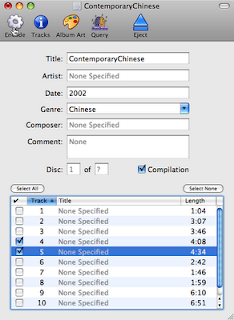


Before you rip tracks, you should set up your output format and directory first. What I did for the format is mp3 from the Max->Preference..., then Format tab. Add available output formats first (select and then + button). In the upper panel, make sure the output formats are checked. The Output tab is the location for ripped files. You can change it from default Audio to anywhere you like.

Now it is ready to go! Click on Encode tool button. The ripper process window is displayed:
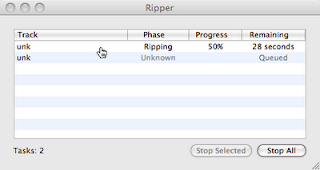


Nice thing is that the Max is free!

As usual, for the installation, I put the decompress folder (Max-0.8.1) to MyApplication folder where is the tools I use (I separate them from Mac's default applications). The next thing is create an alias of Max.app and put it to my Utility folder on the Dock. In case I have not used this tool for a while, I can always find them from my Dock. Even Mac's Spotlight is great to find application, you may not recall the name of program you need.

Tuesday, January 27, 2009

Mac Mouse Cursor Location Tool

Finally, I found a very nice mouse locator tool by 2Point5fish.com It is free! It is specially useful for demo or show cases.

The tool come with configuration in system preference in other area. It is easy to configure. I use F5 key to toggle it and set it indefinitely when it is on. Here is the example of the mouse locator:


From the provider's web site, you may find out more different cursors for use and instructions available as well.

Sunday, January 25, 2009

Tuesday, January 20, 2009

AIM Very Slow On Windows

During my vacation in China, I tried to install AIM on my friends' Windows XP machine (notebooks). The reason is that I thought it might be easy to do video chat with my iMac since iChat only supports AIM accounts.

I only had once success to see my iMac side since I did not have video camera in China. Later on I realized that the Windows browsing becomes very slow. I am not sure it is AIM issue or the internet connection issue. The connections are all ADSL through telephone line. By chance, when I uninstalled AIM on one machine, the painful connection retained back to normal. I am not sure why.

It is too sad that I have no choice to use Skype to do video chatting.