One of iCloud Continuity features is copy/paste. I like this very much. I could type in text on my Mac, then make a copy. With this continuity, I could paste text easily on my iPhone.
However, my recent Mac update from MB Air to MB Pro. I could have this feature to work on my new MB Pro. I tried to search for solutions on web but with no luck.
Apple Support
Today, I decided to get help from Apple. All of my Apple devices are out of Apple Care warrantees, MBP is 2017 and iPhone is XR. I thought that my issue is Mac OS update related issue, I may be able to get help from Apple, based on my previous experience from Apple support.
I phoned 1-800 line. Not waiting for long, I got a real person helper. I told him my story and also mentioned that I have turned on Wifi same network and Bluetooth. That saves him time to investigate issues. He put me on hold to search for support information.
It seems that there is no need having Apple Care to get Apple's support. My case is OS ie iCloud service issue. That's really nice service from Apple.
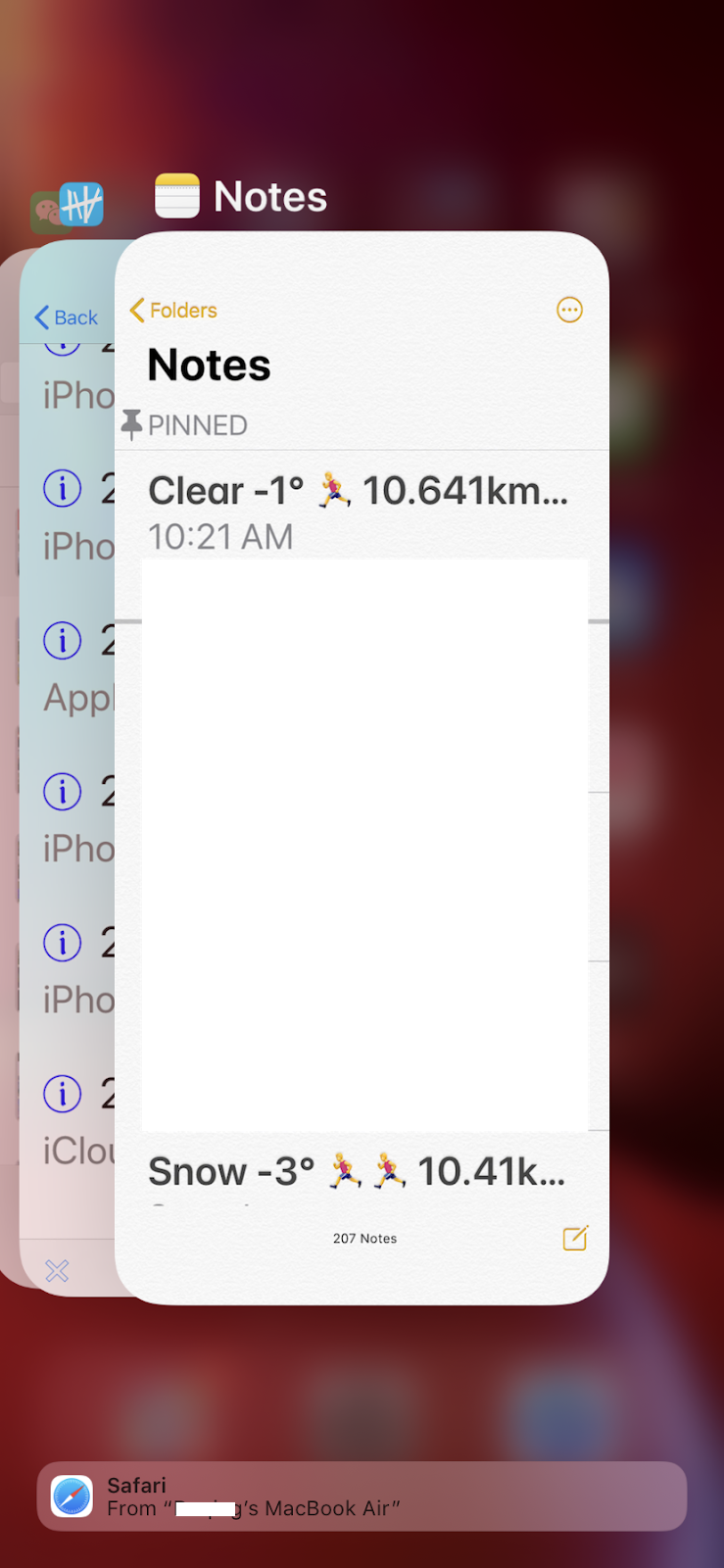
While the waiting time, I tapped my iPhone on bottom and swipe up to get active apps. I noticed that on the bottom, Safari with a message saying to my MBA. I realized that my iCloud might be paired to my iPhone and my previous MBA!

I took my MBA out and turned it on. I tried to copy something text there. Then I got the text pasted on my iPhone. It works, but no my updated MBP.
The helper was back. I told him my findings. I said, it might be my iCloud service is paired between iPhone and MBA. Is there any way to find out this pairing and change it to my MBP? I asked.
To cut story short, he said that it is beyond his knowledge to solve the issue. He has to pass it to senior person to provide solution.
Solution for iCloud Continuity and Universal Clipboard
The second helper was a lady. She remotely accessed to my Mac. Quickly with her investigation and suggestions, I finally get Continuity and Universal Clipboard working!
She asked me to restarted my iPhone and Mac first. I said I tried that, still not working. Then she told me to sign out my iCloud from my iPhone (General | My Apple ID... | Sign Out). Then restart my iPhone, sign in again.
It took a while to get all the data back from iCloud. She told me to log on my MBP. I opened my Notes app. I tried to type something there. Quick I saw the changes are reflected on my iPhone. This part is working.
However, the universal clipboard is not working, still I cannot paste text copied on my Mac.
She continued to investigate my Mac. From System Preferences, in Profiles, she found some malware on my Mac! That's amazing, first time found malware on Mac, from Apple support.
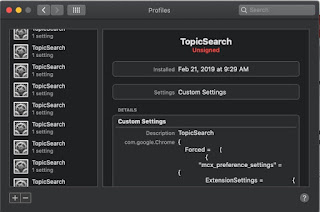
She told me to press "-" to remove them first. Then She told to get a tool to remove it from my Mac. The tool is from malwarebytes.com. That's another surprise for me, using third party app to kill malware. I was hesitated, but I followed her suggestion.
I downloaded the installation package from malwarebytes.com, installed it, then opened it. She told me to scan first. TopicSearch was found in system library. Final step was to remove it. If I was convinced my 1-800 number is correct, I would not do that.
After I restarted my Mac again. I gave copy/paste a try in Notes app. Finally, it was working. The problem was resolved!
"Thank you very much, your Apple support is super!" I finally told her. She smiled.
My Understanding of iCloud Continuity
After everything is working between my iPhone and new MBP. To my surprise, my MBA also keeps working iCloud. I tried to copy of an image in MBA, and I could paste it in my MBP and iPhone!
Based on this experience, my initial understanding of iCloud Continuity was not correct. It is actually not pairing of iPhone and another device such as Mac. It is the continuity among all iCloud based devices.
I think that initially I configured the continuity feature in both iPhone and MBA. Somehow, my when I later added my MBP, the cached configuration did not pick the new device automatically. As Apple helper did, I had to sign out iCloud from my iPhone and sign in again. All devices I set up in my iCloud them are recognized.
It is really cool to see iCloud continuity working among all Apple devices.
References
Apple Support Line in my iOS app. I made a record by a tap in
my app with following note:

I saved all my Apple related stories, activities & events in TapToCount-3W app. It makes me easy to recall and find contact information.
Malwarebytes:
How to install Malwarebytes



 Today I received one letter from from Apple by email. It is about iMac 21 sold between Oct 2009 to July 2011. The letter indicates that my iMac's HD may fail anytime and Apple is going to provide free replacement. I checked my iMac 21, and found that I have a blog about this model. Actually, the date is on Aug 16, 2011, about one month after the time range.

 Posts
Posts

