Sunday, September 23, 2012

Update: iPhoto 9.4 and Xcode 4.5

I just finished two more updates: iPhoto 9.4 and Xcode 4.5. Those updates are all related to the new iOS 6. I installed iPhoto first. After that, I restarted my Mac and then installed Xcode. The Xcode took a long time do finish. I saw first download is 1.32GB and next one is 1.61GB. Not sure why there were two downloads.


The following is the comparison of spaces used before and after of the updates:

Command: df -lakUsed(Kilobytes in 1024-blocks)
Before...6,430,044
iPhoto...6,195,524
Difference (iPhoto-B)-234,520
Xcode...4,666,576
Difference (Xcode-iPhoto)-1,528,948

OS 10.8.2 Update

I got this update last week. This is the major update since Mountain Lion released. Now all the updates are through Mac Apple Store. All those updates have not be automatically done. I still have to run update in the store.


The following is the comparison of spaces used before and after of the updates:

Command: df -lakUsed(Kilobytes in 1024-blocks)
Before...103,764
After...679,348
Difference (A-B)575,584

Monday, September 10, 2012

Mac Network Issue

Recently, one of my friends asked me to help her to resolve her MacBook Pro issue. She brought in a MBP from oversea. It was working fine when she was oversea. Then it stopped connecting to internet or any network devices through either Ethernet or Wifi when she was back to Canada. She was using local mobile network router when she was oversea. In Canada, she uses Airport Extreme Base Station.

I tried to use System Preference to reset network and tried to reset Airport by Airport Utility. The Wifi was detected, but the MBP could not connect to Internet.  The Ethernet cable was connected but it could not make any network connections. I also tried to reboot the system. It was dead locked.

The Solution


Then I went to web to google solutions. I was lucky to find a solution in short time. Here I repeat it again for future reference.

Delete SystemConfiguration folder in root preferences
  1. Open Finder.
  2. Press Command+Shift+G shortcut key.
  3. It will open a dialog of "Go to the folder". Type in: "/Library/Preferences/SystemConfiguration" (without quotes).
  4. The Folder will open the folder of SystemConfiguration.
  5. Drag this folder to your desktop.
This actually copies the folder to Desktop as the original backup. If the following steps are successful, this folder on Desktop can be moved to trash.

Remove Airport entries in Keychain
  1. Press Command+space to open Spotlight. 
  2. Type in: "Keychain Access" (you may see it while typing. No quotes).
  3. Select Keychain Access and hit Enter key.
  4. Keychain Access app is opened.
  5. Select your default keychain. ("login" is the default if you have not changed).
  6. In the spotlight search area, type in: "airport" (no quotes)
  7. A list of entries of Airport... is displayed.
  8. Select one and press ‘delete’ on your keyboard.
  9. Repeat above step to delete all of them.
  10. Select "System" from the list of Keychains.
  11. Repeat steps 6 to 9 above.
Restart Your Mac

Restart your Mac or MBP. Now you should be able to verify your network connection from System Preference. If the Ethernet is in green, that explains your local network is OK. Try Safari to test your Internet connections.

Reference

Wednesday, August 29, 2012

Mountain Lion: Kernel Panic?

I think I got Kernel Panic since I updated my Mac OS to 10.8. It happened twice. When it happens, the screen suddenly changed into a grey screen with a message in 6 languages. Within seconds, the Mac reboots atomically.

I did not catch the message first time. The second time it was happened in the morning. I logged on to my Mac. Suddenly, the KP happened. I took my iPhone to take a phone.


The screen looks very different from the one I had before. I think this may be the Mountain Lion KP.

Reference


Monday, August 27, 2012

Update: Mountain Lion 10.8.1

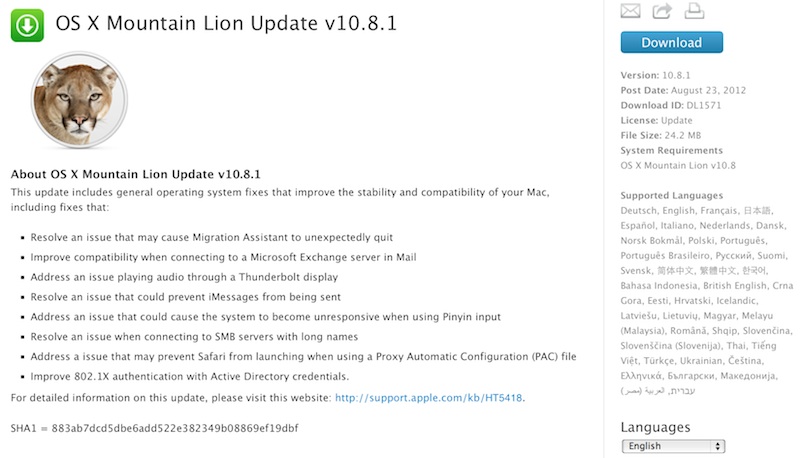
Mountain Lion update 10.8.1 was released on Aug 23, 2012. I did not rush to update my ML. Two days ago I noticed my App Store had several updates, 10.8.1 was one of them. I did not click on update right away. I double clicked on the update item, then I saw a pop up option with "Hide". I clicked on Hide. Suddenly all the update were gone.

I could not find a way to bring hidden updates back. I tried to quit App Store, then reboot my Mac. Still I could not see updates. I thought it may be back later. Today, I still did not see it. I found a way to unhide items from my accounts in App Store. I only got the other two items back, not the 10.8.1. I checked my Mac. It was 10.8.

Then I decided to search for the web if some one else could have similar issue. Soon I found the update on Apple's web page. Here you go, I can get the update from Apple web page. I am so fortunate that this update is available from Apple. Not sure if other updates would be hosted on Apple download page. I doubt if there were.


Since I did not get the update directly from App Store, I don't know how it works. Should that be automatically in a silent mode? Should the download be deleted after update?

The download version is a normal package installation. The package was saved to my Download folder. I had to click on the package of OSXUpd10.8.1.dmg, with 24.2MB in size. The package in exploded to pkg. Click on the pkg, the installation wizard is displayed.

I thought ML's update feature would be done in evenings automatically. So far, all the updates I found from App Store require my interaction to complete. Not sure if there is any thing I miss in the system config. Anyway, I still have chance to compare the disk space difference between before and after.

The following is the comparison of spaces used before and after of the updates:

Command: df -lakUsed(Kilobytes in 1024-blocks)
Before...298,440
After...460,416
Difference (A-B)161,976

References


Saturday, August 18, 2012

RSS Reader

Safari 6.0 removed support for RSS reader. This is a bad news for me, since I have been depending on Safari to read my RSS feeds. What I did was to a folder to my Safari bookmark as named as RSS. Depending on Safari's RSS detection, I saved all the interested RSS feeds to my RSS folder. In Safari 6.0, all those feeds become unreadable.

Based on web search, I found that the alternative way is to use RSS reader apps. RSS reader application is an specialized app handling RSS feeds. A RSS feed is an XML content, based on Web standard. It has been widely used to describe and to update web contents, such as blog entries, news,   data, or anything you want. Since RSS feeds are based on standard format, there have been many RSS based application available to parse and to present information from the standard format.

I found some, and tried them. From my experience, so far I like NetNewsWire the most. It is a free version (you can pay for it if you like). The app is not available at Apple App store. I had to download it from the application's web site.

The app must be signed with developer ID because my Mountain Loin's Gatekeeper only allows Apps from App Store and Identified Developers.

Google Reader as RSS Feed Source

NetNewsWire uses RSS Feeds from Google Reader when you run it first time. For people who don't have Google account, the app will display a list of default RSS feeds. I have Google account and I used Google Reader long time ago. Therefore, it is very convenient for me to get my previous RSS feeds back to alive. In addition to that, I can use NetNewsWire as UI to manage my Google Reader (I don't like Google Reader web site) contents.

UI Layout

The user interface of NetNewsWire is very much like email view: a layout of four panel views. On the left, it is the view of RSS feeds or folders. In the middle, the top panel is a list of entries for a RSS feed, and the bottom panel is a quick view of an entry's content. The right side is a panel with history thumbnails, which provides a quick way to go to previous views.


In the middle section, click on the title of an entry on the bottom panel, the middl section is changed to a browser view. The HTML format of the web content is displayed nicely, as same as I see it in Safari. This view is also added to the history view thumbnails.


RSS Feed Management

Another issue I am interested in is the management of RSS feeds. I need to update or add new RSS feeds. NetNewsWire does not provide a way to edit RSS feed's URL. However, I can do it by deleting one first, and then adding a new one. Deleting a RSS feed in NetNewsWire is called as "unsubscribe". By confirming unsubscribe, I can delete a RSS feed.

I like the way NetNewsWire to add a new RSS feed. I don't need to figure out what RSS feed's URL is. What I need is just to copy a web site URL to Subscribe's dialog. It will be smart enough to figure out if there is any supported RSS feed or not. Since the title information for a RSS feed is normally available from RSS feed, the title information is optional. You can use whatever title you want.

If you copy a URL for subscribe, the Subscribe dialog is smart enough to paste the URL there automatically, very handy!


I tried to delete and to add RSS feeds through NetNewsWire. The changes I made in the app are synced to my Google Reader. The counts for read RSS feeds are also synced as well. That's nice feature. It is almost like a kind of iCloud service.

Reference


Wednesday, August 15, 2012

Mountain Lion Crashed First Time

Today my Mac suddenly crashed. This is the first time I saw a crash after I updated my Mac to ML. My Mac has been running for several days. This afternoon, I logged in to my Mac when I got home after work. Within seconds, My screen suddenly became a while screen, just like a new start. Soon there was a message in the center of the screen about the crash. I tried to read the message, but I was not able to read them. The restart cleared the screen.

After the restart, I got a message about the reboot.


I clicked on Report button, a detail information was displayed. I am not sure if there was commend available before Mountain Lion. I clicked on Comments and I could write something there to tell what was happened.


Before ML, I had several times of blue screen. The blue screen happened like a curtain rolling down from top, and the whole screen became disabled. I had no time to respond or control my UI, and no time to save anything. The blue screen displayed a message about unexpected system panic. I was forced to turn off power. Not sure my sudden crash is the same case of blue screen.