One thing I realized that there is no welcome message when I turn on the iMac. I did TM transfer, which took about 2 hours. There is no installation disk. Not sure how I can get my iLife to the machine. Several days ago I found chat support at Apple's support web site. I just went to the support and could not find chat. I think I have to make a call this week to ask about iLife installation.
Tuesday, August 16, 2011
New iMac 21 Arrived!
One thing I realized that there is no welcome message when I turn on the iMac. I did TM transfer, which took about 2 hours. There is no installation disk. Not sure how I can get my iLife to the machine. Several days ago I found chat support at Apple's support web site. I just went to the support and could not find chat. I think I have to make a call this week to ask about iLife installation.
Mac OS 10.7.1 Update
The following is the comparison of the used space difference between before and after:
| Command: df -lak | Used(Kilobytes in 1024-blocks) |
|---|---|
| Before | ..1,304 |
| After | ...3,080 |
| Difference (A-B) | 1,776 |
Sunday, August 14, 2011
COPY DVD Disk
DUPLICATE TO HD
The first method is to use Finder to make a copy of DVD and burn it to DVD:
- Insert the original DVD. Open Finder
- Select the DVD
- Right click or Control+click on the DVD, select Dupliacte. This will copy the whole DVD back to my Desktop. The copy may take a while.
- When the duplicate is done, insert a blank DVD. Select the folder and click on Burn on toolbar if it is available. Or control+click on the folder and select "Burn ... to Disc..."
Using Disk Utility Tool
I did search on Web to find out if my above method is correct of not. What I found is that there is alternative way to make a copy of DVD.
Launch Disk Utility Tool first (from Spotlight, type in Disk...). Put the original DVD into DVD driver.
- From the left panel, select the whole DVD (not the sub-node item).
- From menu select File|New|Disk Image From...
- In the following dialog, for Image Format, select DVD/CD master. Leave the encryption as none.
After the car file is created, insert a blank DVD into DVD driver. Stay in the Disk Utility Tool, the cdr file should be displayed on the left panel.
Select the cdr file, click on Burn tool bar item. This will prompt another window. My experience is to selected 2x speed.
Conclusion
I did my DVD copy in Lion. Both methods seem working fine. My DVD does not contain chapters or other menu options. I am not sure if the first simple method will work for chapter DVD or not. According to some people suggestion, the second method seems better.
I would copy the cdr file to an external HD for backup. If I need to make another copy, I then can us it to save my half time of the DVD copy.
Reference
The following is a Youtube DIY on this topic.
Copy a DVD using Disk Utility
Thursday, July 28, 2011
Lion Boot Disk
It approved that my way to burn dmg file is not the right way. I could not find out my DVD. During the restart process, the boot selection is turned on when the option key is pressed. However, I found that there was two disks to boot: my Mac Lion HD and a Recovery HD. I have never seen this Recovery HD before. I think that Lion creates a boot disk in my HD. Since there is no disk available for Lion installation, there should be a way to boot in case of HD repairing. Now I recall that Snow Leopard recommends to use the original disk to boot and to use the Disk Utility tool to verify and repair HD.
To verify the Recovery HD is really a Lion boot disk, I started my OS from the Recovery HD. It is a Lion boot HD. Here is the entrance of the startup:

Here is the menu item of Utilities:

Here is the Disk Utility. As in the window, Disk 1 contains a Mac OS X Base System:

I copied my Lion dmg file to my desktop and then followed the correct instruction to burn my Lion dmg file from Disk Utility app. Now the new DVD is bootable. Here is my second try of restart with boot disk selection:

I verified the DVD disk by selecting it as start. It took several minutes, maybe 10+ minutes to load start files. The DVD media is just too slow to start up. That's why Apple does not like optical disk at all. It is just like floppy disk ten years ago. It is time to retire DVD/CD media.
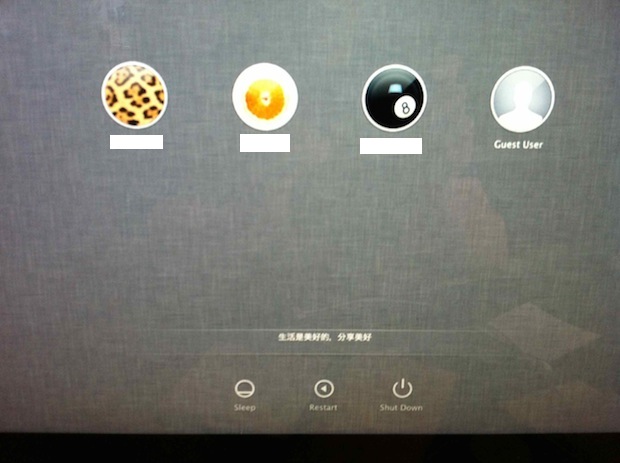
After all these tests, I am back to my Lion. The new log in window is very different from the previous one, and I like its simple interface. One thing I realize is that the resume seems working when I log in: all the previously opened windows are resumed. Another thing I noticed that re-log in after sleep or lock is much faster than before. It takes less than a second to bring me back. I remember that Snow Leopard takes several seconds to resume network connection, specially when Safari is opened. Now everything is back instantly.
Saturday, July 23, 2011
Mac Lion Update
First, I need to get redeem code from Apple. There is Apple web page for Canadian Mac users to get free Lion redeem code. This site is for Canada. I was trying to get it from US Apple site, and I could not pass through. It was hard to find it out from Apple web site. I found it from from MacRumors forum.
At the end of the process, I saved the result as PDF(or print it as PDF). It is critical to remember the redeem code. Then it is very straightforward to get it is from Apple Store. Now it is in downloading process. I started at about 9:00am.

I also found this CNET News article about to burn DVD for Lion Installation. I am going to follow the instruction to give it a try.
At: 10:02, the download is done.

I have installed Lion on my 3 Mac computers. One more to go, but I have to wait to make sure my daughter's Adobe's apps are OK with Lion.
After the installation, there is one new update: iTunes 10.4.1 with support of full screen.

Here is the space difference between installations of Lion and iTunes update:
| Command: df -lak | Used(Kilobytes in 1024-blocks) |
|---|---|
| Before | ..,13,796,024 |
| After Lion | ...8,780,612 |
| After Update | ...9,450,752 |
| Difference (A Lion-B) | -5,015,412 |
| Difference (AU-AL) | 669,960 |
From the appearance, at first glance, it looks like the same as before. However, after playing for a while, I noticed some big differences. For example, srcollbars are different. The default scroll behavior does get awkward, but it is very easy to get used to it.
The biggest issue I have right now is the Preview's SaveAs is gone. I could not use previous Cmd+Shift+s to get difference format for pictures. I have to use Export or Duplicate and Save. The Save dialog does not display file size information. This is a problem for me. I would like the different format to compare the picture size difference so that I'll make decision to save it or not.
Another big change is that Java is not installed by default. I tried to test Adobe PS and it prompt to install Java.
References
- Apple Free Lion web page for Canadian new Mac users
- MacRumors Forum: free Lion for Canadian Mac users
- CNET MacFixIt article: how to make a DVD disk of Lion
- MacFixIt: how to install Front Row on OS Lion
- MaxFixIt: how to keep Snow Leopard when update to Lion
- ScreenCastOnLine: Full Free Show SCO0305a - Installing Lion(also available on iTunes podcast)
Friday, July 22, 2011
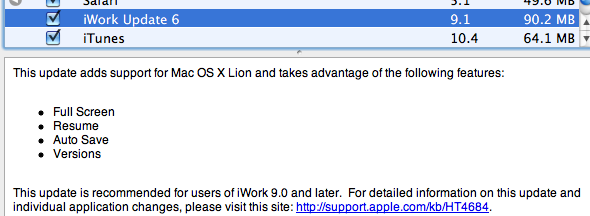
Mac Software Updates: 5 Items


The following is the comparison of the used space difference between before and after:
| Command: df -lak | Used(Kilobytes in 1024-blocks) |
|---|---|
| Before | ..509,088 |
| After | ...418,125 |
| Difference (A-B) | -90,964 |
Saturday, July 16, 2011
iWeb and iDVD Updates


The following is the comparison of the used space difference between before and after:
| Command: df -lak | Used(Kilobytes in 1024-blocks) |
|---|---|
| Before | ..913,604 |
| After | ...711,608 |
| Difference (A-B) | 201,996 |
Subscribe to:
Posts (Atom)