Friday, July 22, 2011

Mac Software Updates: 5 Items

Today I got 5 items of updates: Mac Migration Assistant, iWork, iTunes, RemoteDeskTop, and Safari. Not sure if they are related to the preparation of the new Mac Lion or not. My Macs have not updated yet. I may get updates when my daughter is back tonight, because she has a new MacBookPro purchased last week. She is entitled to get the new update of OS Lion.
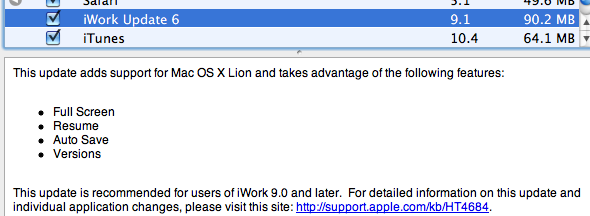


The following is the comparison of the used space difference between before and after:

Command: df -lakUsed(Kilobytes in 1024-blocks)
Before ..509,088
After...418,125
Difference (A-B)-90,964

Saturday, July 16, 2011

iWeb and iDVD Updates

It is close to Lions release. I got the following updates which do not seem related to Lions. I'll not rush to Lions update when it is out because my daughter just purchased MacBookPro 15 about one week ago. She is legible to get free Lions update from App Store. I am not sure if I can use the same one for my other computers or not.


The following is the comparison of the used space difference between before and after:

Command: df -lakUsed(Kilobytes in 1024-blocks)
Before ..913,604
After...711,608
Difference (A-B)201,996

Thursday, June 23, 2011

Mac OS 10.6.8 and Epson Printer 2.7 Updates

The Mac OS 10.6.8 Update is property for the preparation of Lion OS, based on the information from AppleInsider: enhancement for the App Store. Epson printer is the update from the printer supplier Epson.


The following is the comparison of the used space difference between before and after:

Command: df -lakUsed(Kilobytes in 1024-blocks)
Before ..346,204
After...420,900
Difference (A-B)74,696

Saturday, June 18, 2011

AirPort Utility Update 5.5.3

This is a update about AirPort Utility update 5.5.3.


The following is the comparison of the used space difference between before and after:

Command: df -lakUsed(Kilobytes in 1024-blocks)
Before ..7,202,344
After...6,720,,920
Difference (A-B)-481,424

iPad Interface Quirk: Parallel Fingers in Frame with Scrollbars

I tried to use iPad to read my programming blog long time ago and I realized that some frames with scrollbars were static, for example, CodeDom and Expression Calculator (2). I thought that iPad browser does not support scrollbars.

To my surprise, I just found a solution. In iPad, scroll bar are not visible by default. Actually, iPad does support scrollbars. In the case of frame, you have to move the content by two fingers. According to this blog(iPad interface quirk: scrolling frames lack scrollbars), it notes that this feature is in iPad's menu. I gave it a try. It does work.


In above case, it obviously shows the content flow. You can apply the same rule when you see a frame with content overflow even without scrollbar hint. The following picture is from another blog on this trick(Make Your iPad Dance with Two Fingers):

Tuesday, June 14, 2011

iPone Tip: Autocorrect

Just watched a tip from Apple's iPhone Quick Tips. Here are some snap-shots about the tip.

When you type, you may see hint for correction:


You may miss to correct the wrong word:


Just tap the word, you will see corrections:


and you can tap the correct word:

Wednesday, June 8, 2011

iTunes 10.3.1 Update

After WWDC11 opening keynote speech by Steve Jobs two days ago, Apple silently released this iTunes 10.3.1 update. I believe this one is related to iCloud free service. I am actually expecting Lion update.


The following is the comparison of the used space difference between before and after:

Command: df -lakUsed(Kilobytes in 1024-blocks)
Before ...39,804
After...50,256
Difference (A-B)10,452